
Holy Bible Launcher: KJV+Audio
AtomApplicationsBooks & Reference
4.82.61K Reviews
- Version
- 3.23.0
- Installs
- 1.00M
- Age Rating
- Everyone
Screenshots
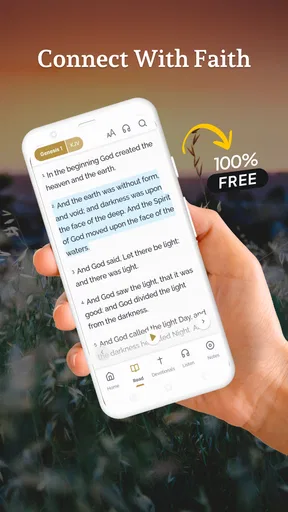
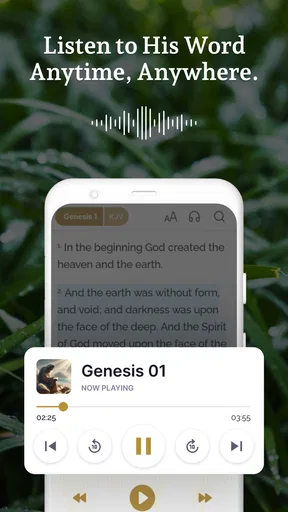
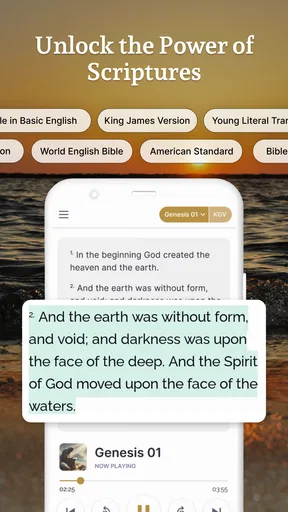

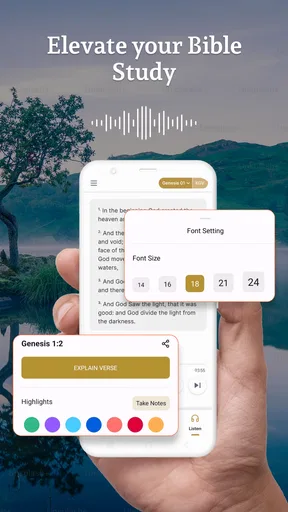
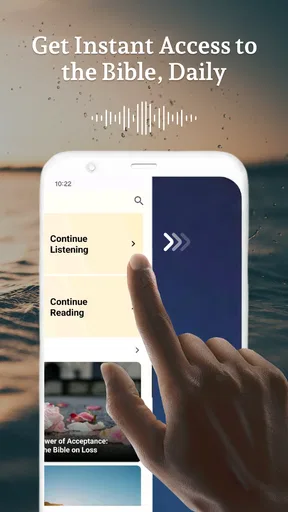


Our Review of Holy Bible Launcher: KJV+Audio
 Analysis by Appyee
I approached Holy Bible Launcher: KJV+Audio as someone looking for a simple way to keep Bible reading close at hand rather than as a full study suite. It is a free Books & Reference app from AtomApplications, built around the King James Version and audio listening. The idea is straightforward: make Scripture easier to reach during ordinary moments, whether that means reading a passage in the morning, listening while doing chores, or opening a verse when I want a short pause during the day.
That focus is also the first thing to understand. This is not trying to replace every Bible resource, commentary collection, or church study tool. Its appeal is the combination of a familiar translation, daily reading, and a launcher-style approach that encourages repeated access. I found it most useful when I treated it as a quiet reading habit rather than expecting a large research platform.
What to expect from the KJV and audio approach
The app centers on the King James Version, so the language has the formal, traditional style many readers already appreciate. For people who grew up with the KJV or want to read it specifically, that consistency matters. For someone new to older English, however, the wording can require patience. I would not choose this as my first Bible app if I wanted modern phrasing or side-by-side translations, because the experience is clearly shaped around one established version.
The audio option changes how I use it. Reading is ideal when I have a few quiet minutes, while listening works better when my hands and eyes are occupied. A realistic example is a weekday morning: I can open a passage before leaving home, read a small portion with my coffee, and later return to audio while preparing dinner. That kind of flexibility makes the app feel more practical than a reading-only tool.
The launcher concept is especially suited to people who benefit from a visible reminder. Instead of relying on memory to search for a Bible app, I can make Scripture part of the normal rhythm of using my phone. The value is less about a complicated feature set and more about reducing the distance between intention and action. If I already want to read daily, that convenience can make the habit easier to maintain.
Its reception also suggests that this focused approach connects with many users: the app has a 4.7 average from around 6.7 thousand ratings and more than 1 million installs. Those figures do not change my own assessment, but they help place it among established choices rather than an obscure experiment. It is rated for Everyone, which fits the calm, reference-oriented purpose of the app.
Who will feel at home here
I would recommend it first to KJV readers who want quick access without building a complicated study workflow. It also suits someone who wants audio available for commuting, household tasks, or a short reflective break. Families may appreciate the straightforward presentation and Everyone age rating, although personal preferences about the KJV’s language still matter.
It is less suitable for readers who need several translations, extensive scholarly notes, original-language tools, or a detailed cross-reference system. Those users may be better served by a dedicated study Bible app. Likewise, if I wanted a social reading plan with group discussion and shared progress, I would look elsewhere rather than expecting this compact launcher to provide that experience.
Getting started without overcomplicating the first session
The first setup should be approached with one goal: reach a passage and make sure the reading style feels comfortable. After installing it, I would avoid trying to explore every option immediately. I would open the Bible section, choose a familiar book or a short passage, and read enough to judge whether the KJV wording works for me. That quick test is more useful than deciding based on screenshots or the app’s name.
The app is free, so the initial decision is not about committing money. It is about whether the presentation and translation fit the way I actually want to read. I would give myself a few minutes to notice whether the text is comfortable on my phone, whether the navigation feels clear, and whether audio is something I would realistically use. A Bible app can be excellent in theory and still fail if opening it feels like work.
For the first audio test, I recommend choosing a passage I already know. Familiar content makes it easier to focus on the listening experience instead of wondering whether I missed the meaning. I would begin at a low volume in a quiet room, then try the same feature in a normal household setting. This gives a more honest sense of whether audio will become part of my routine or remain an occasional extra.
One useful habit is to decide in advance when the app will be used. “I will read sometime today” is vague, while “I will open it after breakfast” gives the launcher a clear job. If mornings are rushed, an evening listening session may be more realistic. The app can support either approach, but it cannot choose a sustainable routine for me.
Because the current version is 3.19.0 and the minimum requirement is Android 10, compatibility is worth checking before planning around it. On a newer Android phone, that requirement should be easy to meet; on an older device, it is the practical gatekeeper. I would check the operating system first, especially if I am installing it on a secondary or family phone.
The first meaningful success: read one passage and hear it
My recommended first success is deliberately small: open one passage, read it slowly, and then listen to that same passage. This two-part test shows the app’s main value better than browsing menus. Reading lets me assess the KJV text, while audio reveals whether the app can fit into moments when I cannot keep looking at the screen.
I would not begin with an ambitious multi-hour session. A short passage creates a clear finish line, which is helpful for a first-time user who might otherwise spend more time configuring than reading. Once that first session is complete, I would decide whether the app belongs in my daily routine. The important question is not whether I explored everything; it is whether I returned to the content with less friction than before.
For daily use, I find it helpful to separate “reading time” from “listening time.” Reading asks for attention and a screen, while audio can accompany a walk, tidying, or a quiet commute. Treating them as different modes prevents disappointment. If I expect audio to replace focused reading every time, I may miss the slower reflection that comes from seeing the words myself.
A second practical tip is to use the launcher as a prompt, not as a command. If the reminder appears at an inconvenient moment, I would not dismiss the whole habit; I would choose another time later in the day. The strongest routine is one that survives busy schedules. The app’s simple access is helpful, but flexibility in my own expectations is what makes daily use realistic.
Small points that can confuse new users
The word “launcher” may lead some people to expect a complete replacement for the phone’s main home screen. I would interpret it more modestly: the app’s purpose is to put Bible access and daily reading closer to the front of my routine. If I install it expecting a broad phone customization tool, I may misunderstand what it is trying to do. Its usefulness is devotional access, not general device management.
Another possible confusion is the relationship between reading and audio. Audio is not automatically the best choice for every situation. In a noisy environment, I may lose details; while multitasking, I may hear the words without absorbing them. I use listening as a second route into the passage, then return to the text when I want to study a phrase or think carefully about its meaning.
The KJV itself can also be mistaken for a problem with the app. If words such as “thee,” “thou,” or older sentence structures slow me down, that is a translation preference issue rather than a navigation failure. I would give it a fair trial with a familiar chapter, but I would not force myself to use it if modern English is essential to my understanding. A different Bible app may be the better choice in that situation.
Users who expect elaborate study aids should set their expectations early. This app’s strongest identity is quick Bible access with audio, not a research desk. I would keep a separate reference tool available if I needed commentary, language notes, or comparison between translations. That is not a criticism of the launcher concept; it is simply the trade-off that keeps the experience focused.
There is also a difference between having access to audio and building a listening habit. I found that the feature becomes more valuable when connected to a specific activity, such as a walk or household task. Without that connection, it is easy to open the app, browse briefly, and leave without listening. My practical solution is to choose the passage before starting the activity, so the phone is ready when the moment arrives.
How it compares with familiar alternatives
Compared with a printed KJV Bible, the app is more convenient for carrying a large amount of text and adds audio. A physical Bible still offers a calmer, screen-free experience and may be preferable for extended study. I see the app as complementary rather than a universal replacement: it is better when I need portability and quick access, while paper can be better when I want fewer digital distractions.
Compared with broad Bible apps, this one has a narrower identity. Larger alternatives may offer multiple translations, reading plans, notes, highlighting, community functions, and extensive search tools. Those extras are valuable for structured study, but they can also make a simple reading session feel busy. I would choose this app when the KJV and direct access matter more to me than having every possible feature in one place.
Compared with a general audiobook player, the dedicated Bible focus is more convenient because I do not need to manage the content as a separate book in a larger library. A general player may offer stronger playback controls or broader listening options, but it does not provide the same Scripture-centered entry point. The better choice depends on whether I want one focused Bible habit or a single app for all spoken content.
That comparison highlights the main trade-off: simplicity versus breadth. Holy Bible Launcher: KJV+Audio is easier to understand when I want one translation and two main ways to engage with it. It becomes less compelling when my needs expand into translation comparison, academic study, or collaborative reading. Knowing that before installing it prevents the common mistake of judging a focused tool for not behaving like a large platform.
Building a routine that lasts beyond the first day
After the first successful reading and listening session, I would choose a modest next step rather than turning the app into a demanding project. For example, I might read a short passage at a consistent time and use audio on a different day when my schedule is crowded. This keeps both modes useful without making the routine feel repetitive.
I would also pay attention to the difference between convenience and attention. The launcher can help me remember to open Scripture, but the quality of the session still depends on how present I am. If I keep getting interrupted, I would move reading to a quieter part of the day and reserve audio for activities where listening is safe and practical. That adjustment is more helpful than blaming the app for a schedule mismatch.
For a family member or friend, I would recommend starting with the same simple test: read a familiar passage, listen to it, and decide whether the KJV feels natural. That gives a clear answer to the most important questions about translation, usability, and audio without requiring technical knowledge. Since the app is free and intended for Everyone, it is easy to try, but a good recommendation should still respect individual reading preferences.
AtomApplications has kept the product focused enough that I can understand its purpose quickly. The current release, 3.19.0, is the version I would look for when checking that my installation is current, while Android 10 is the minimum operating system requirement to keep in mind. These details are practical rather than exciting, but they matter when setting up an older device or helping someone else install it.
My final view is positive, with a clear condition: I would choose it for a straightforward KJV reading and listening habit, not for advanced Bible research. The strongest benefit is the reduced friction between wanting to read and actually opening a passage. The main limitation is equally clear: readers who need modern translations or a deep collection of study tools may outgrow it quickly.
If that focused purpose matches what I want, I think Holy Bible Launcher: KJV+Audio is an approachable place to begin. I can install it without paying, test the KJV immediately, and discover whether audio fits my day. For me, its success is measured less by how many options it offers and more by whether I return tomorrow for another passage. On that practical test, it earns a recommendation for KJV readers who value simple, repeatable access.
Privacy and Permissions
See what permissions an app requests and how it handles your data.
- Location
- precise location (GPS and network-based)
- Other
- view network connections, expand/collapse status bar, full network access, run at startup, set wallpaper, control vibration, prevent device from sleeping, Google Play license check
Verdict
Strengths of Holy Bible Launcher: KJV+Audio
- Quick access to KJV verses directly from the home screen.
- Audio playback makes listening convenient during commutes or quiet time.
- Clean religious focus with minimal distractions from other content.
- Useful search helps locate specific passages faster.
- Can support daily scripture habits through convenient reminders.
Limitations of Holy Bible Launcher: KJV+Audio
- KJV language may feel difficult for readers unfamiliar with older English.
- Audio features may require an internet connection or extra storage.
- Home-screen customization could feel limited compared with standard launchers.
- Frequent verse displays may not suit users wanting a neutral home screen.
- Some features or content may include ads or optional in-app purchases.
Other Releases by AtomApplications
View All
QR & Barcode Scanner Launcher
Tools4.2

Brightest Flashlight Launcher
Tools4.3

2026 Calendar Launcher
Productivity4.4

Alarm Clock Launcher
Productivity4.3
Similar Picks in This Category
View All
Google Play Books & Audiobooks
Google LLC4.7

네이버 - NAVER
NAVER Corp.3.5

Wattpad - Read & Write Stories
Wattpad.com3.7

King James Bible - Verse+Audio
Ozion4.8

Bible Offline-KJV Holy Bible
Bíblia Offline4.9

Amazon Kindle: Reading App
Amazon Mobile LLC4.8
Frequently Asked Questions
What is Holy Bible Launcher: KJV+Audio?
Holy Bible Launcher: KJV+Audio is an Android app designed to make Bible reading more accessible from the device’s home screen. It focuses on the King James Version and may include audio playback, daily verses, shortcuts, and devotional-style access depending on the installed version. The launcher-oriented design is intended for users who want Scripture available quickly without searching through several menus.
Does Holy Bible Launcher: KJV+Audio work offline?
Many Bible apps allow downloaded text to be read without an internet connection, but offline availability can vary by feature and app version. Before relying on it during travel or in areas with weak coverage, open several books and chapters while connected, and test the audio separately. Streaming audio, advertisements, synchronization, and some external links may still require mobile data or Wi-Fi.
Is the King James Version available in full?
The app is centered on the King James Version, so users should expect access to its traditional wording and the complete collection of biblical books supported by the application. Navigation is generally organized by testament, book, chapter, and verse. Because editions and included resources can change, check the store listing and in-app library to confirm exactly what is provided before downloading.
Can I listen to the Bible with audio playback?
Audio is one of the main reasons to choose Holy Bible Launcher: KJV+Audio. Depending on the selected passage and the app’s current implementation, you may be able to play chapters or verses aloud and control playback from the reading interface. Audio quality, voice selection, background playback, and offline listening can differ, so users should review permissions and test playback after installation.
Is Holy Bible Launcher: KJV+Audio free and safe to install?
The application may be available as a free download, although it can contain advertising, optional purchases, or features that depend on the developer’s current release. Install it only from an official Google Play or Apple App Store listing, verify the developer name, and review requested permissions. A Bible reader should not need excessive access to contacts, messages, or unrelated personal information.
